
RouteReceipts vs Stripe Native Receipts Comparison
Sending receipts to all Stripe customers can create hundreds of irrelevant emails and extra support work. This routereceipts vs stripe native receipts comparison examines selective receipt delivery, pricing, auditability, and operational risk. RouteReceipts is a specialized application that keeps an allowlist in the Stripe dashboard so businesses send receipts only to chosen customers. Our app adds a dashboard-native UI, a decision audit log, and a Stripe Marketplace install so no custom webhooks are required. RouteReceipts uses tiered pricing with a free plan that includes 20 receipts per month and paid options for higher volume. See our setup guide and FAQ in the RouteReceipts Core resources for install and data-handling details. Which approach reduces email noise without increasing audit or compliance risk?
Which receipt-routing options should you evaluate for Stripe?
Evaluate five practical approaches: Stripe native receipts, Route Receipts, no-code automation tools, custom webhook builds, and third-party invoicing platforms. Each option trades off setup time, per-customer control, auditability, and operating cost. Use this checklist to rule out options that add risk or maintenance overhead and to find the fastest path to send Stripe receipts only to selected customers.
What does Stripe native receipts do? 📧
Stripe native receipts either sends receipt emails to every customer or turns email receipts off entirely. This requires zero setup and works immediately for basic merchant needs. The trade-off is that you cannot target which individual customers receive invoices or payment emails. Example: a subscription marketplace that must send receipts only to enterprise buyers cannot implement per-customer rules with native receipts alone. For teams that accept the all-or-nothing model, native receipts minimize engineering work but increase support noise when many customers receive unnecessary emails.
What is Route Receipts and how does it work? 🧭
Route Receipts is a Stripe app that routes invoice and payment emails using an allowlist you manage inside the Stripe dashboard. Our Route Receipts dashboard adds a simple allowlist UI, a decision audit log for transparency, and a Marketplace installation that avoids custom webhook builds. Example: finance teams can add enterprise customers to an allowlist and stop receipts for retail customers without asking engineering for a one-off rule. See the RouteReceipts documentation for step-by-step setup and the RouteReceipts FAQ for plan and privacy details. For a deeper walkthrough of the app experience, read our user guide.
How do no-code automation tools handle receipt routing? 🔁
No-code automation tools (Zapier, Make, Pabbly) intercept Stripe events and send conditional receipts without writing backend code. They reduce initial developer time and let product teams prototype routing rules quickly. The trade-offs are operational complexity, monthly task or execution limits, and the need to manage additional accounts and credentials. Example: a small SaaS team can prototype selective routing with Zapier but must monitor monthly zap executions to avoid throttling or unexpected costs. > 💡 Tip: Disable Stripe automatic receipts before testing a no-code flow to prevent duplicate emails. For long-term, auditable routing inside Stripe, consider using Route Receipts instead of chaining automations.
What are the trade-offs of building a custom webhook solution? 🛠️
A custom webhook solution gives full control over routing decisions but requires engineering time, monitoring, and ongoing maintenance. You must build duplicate protection, error handling, delivery retries, and logging before the system is reliable. Example: a small engineering team may spend multiple days implementing and testing routing logic, then weekly hours maintaining edge cases and investigating missed or duplicated emails. Those recurring costs increase total cost of ownership and operational risk compared with a packaged app that provides audit logs and a dashboard for non-developers.
Which third-party invoicing platforms offer selective receipt delivery? 🧾
Third-party invoicing platforms such as Monite or Square Invoices often include finer delivery controls but usually require migrating billing workflows or syncing customer and invoice data. These tools can solve selective invoice delivery, but they may not integrate cleanly with an existing Stripe billing system and can introduce data residency or auditability questions. Example: a company that moves invoicing to a third-party may need to rework webhook flows, migrate historical invoices, and verify that accounting exports match Stripe records. If you plan to keep Stripe as your billing engine, evaluate Route Receipts for allowlist-based delivery without full billing migration.
| Option | Primary benefit | Primary trade-offs | Best fit |
|---|---|---|---|
| Stripe native receipts | Zero setup, immediate email delivery | No per-customer control; can create inbox clutter | Very small merchants or single-use cases |
| Route Receipts | Dashboard allowlist, audit log, Marketplace install | Adds a managed app to your Stripe account | Platforms, SaaS, marketplaces needing selective delivery |
| No-code automations (Zapier/Make/Pabbly) | Fast prototyping without code | Task limits, extra accounts, duplicate risk | Small teams testing rules before committing |
| Custom webhook build | Full flexibility over logic and templates | High engineering cost, maintenance burden | Teams with dev resources and bespoke needs |
| Third-party invoicing platforms | Rich invoice features and delivery controls | Billing migration, data residency, integration work | Businesses ready to move billing off Stripe |
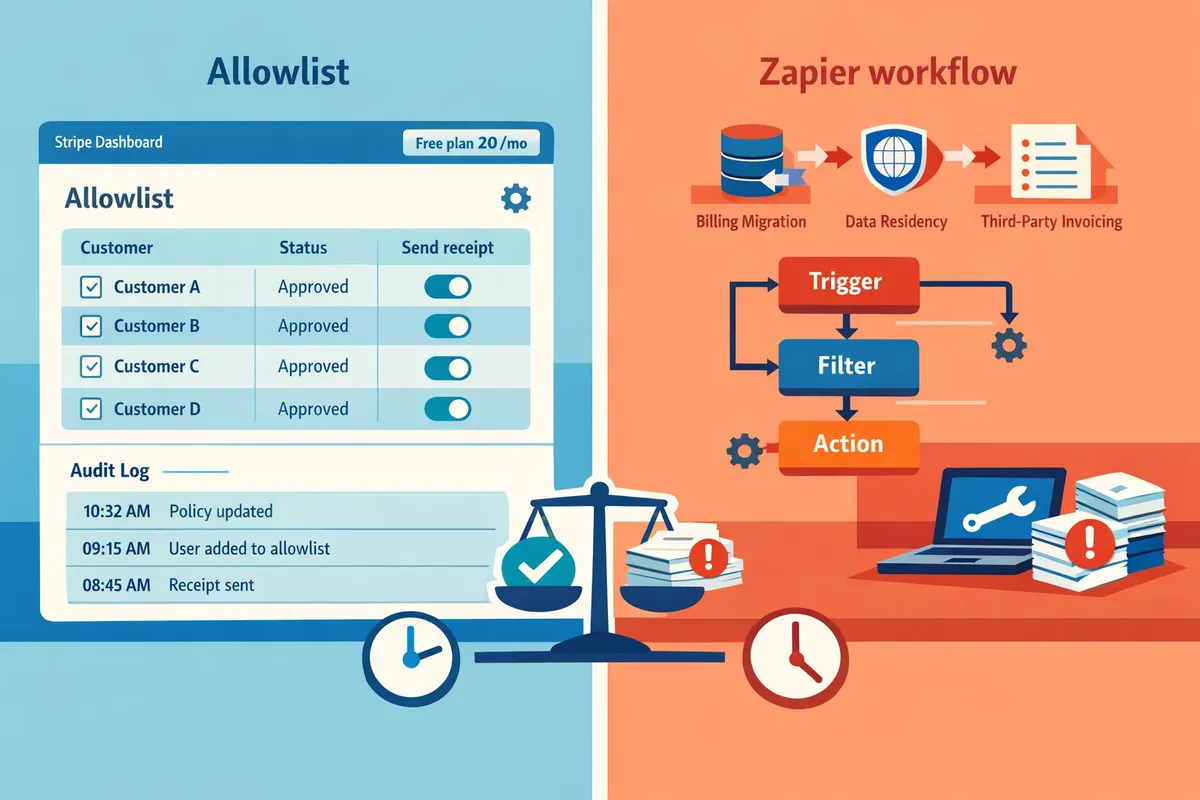
For setup details, data handling, and privacy practices related to Route Receipts, see our RouteReceipts documentation and the RouteReceipts FAQ. For guidance on which customers should receive receipts, review our decision framework article on which customers should receive Stripe receipts.
How do Route Receipts and Stripe native receipts compare side by side?
Route Receipts is a Stripe app that provides selective, dashboard-native receipt delivery; Stripe native receipts send invoice emails to all customers by default. This side-by-side comparison focuses on capabilities, time-to-value, pricing and limits, auditability, and operational risk so procurement and finance teams can quickly rule options in or out. Use the matrix and modeled examples below to map each option to your use case.
Feature matrix 🧾
Route Receipts offers per-customer allowlists, dashboard controls, and a decision audit log while Stripe native receipts provide only global send settings. Below is a quick matrix you can scan for must-have criteria.
| Capability | Route Receipts | Stripe native receipts | No-code automation (Zapier/Make/Pabbly) | Custom webhook build |
|---|---|---|---|---|
| Selective delivery (per-customer) | Yes. Allowlist managed inside Stripe dashboard. See the user guide for rules. | No. Sends to all customers or none. | Partial. Can route using metadata but requires mapping and testing. | Yes. Full control but needs dev work and testing. |
| Native Dashboard control | Yes. Install via Stripe Marketplace; manage allowlist without leaving Stripe. | Native settings only for global receipt toggles. | External dashboard; not inside Stripe. | No native UI unless you build one. |
| Decision audit logging | Yes. Records routing decisions and metadata linked to your Stripe account. | Limited to Stripe event logs; no per-routing allowlist log. | Varies by vendor; logs exist but may be fragmented. | Depends on implementation; requires design to meet audit needs. |
| Setup time | Low. Marketplace install and allowlist creation. | None to toggle, but no selective rules to configure. | Low to prototype; requires rule testing for production. | High. Architecture, security review, and testing. |
| Ongoing maintenance | Low. Minimal ops beyond occasional allowlist updates. | Low (no routing work). | Medium. Automation recipes break when events change. | High. Patch, monitor, and update webhooks over time. |
| Compliance controls (data access, retention) | App stores routing metadata; refer to privacy policy and docs for retention rules. | Uses Stripe's retention and logs. | Third-party vendors may access customer emails and invoice content. | Under your control, but you assume full compliance burden. |
💡 Tip: Before enabling any routing app, follow the setup steps in the RouteReceipts documentation to disable Stripe automatic receipts and avoid duplicate emails. See the complete user guide for step-by-step setup.
Pricing and limits for stripe receipt routing apps 💰
Route Receipts uses a tiered model with a free entry plan that includes 20 receipts per month; other options charge by subscription, usage, or engineering time. Pricing and limits matter when monthly invoice volume exceeds the free tier or when internal development costs start to outweigh subscription fees.
- Route Receipts. Free plan with 20 receipts/month; upgrade paths exist for higher volume. See the FAQ and docs for current plan details and upgrade steps. Use the free tier to pilot selective sending for a small segment before upgrading.
- Stripe native receipts. No per-receipt routing fees because there is no selective routing, but there is an indirect cost from extra support tickets and unnecessary emails. Those support costs scale with transaction volume.
- No-code automation. Monthly subscriptions plus per-action costs can scale quickly as receipts grow. Good for prototypes but expect recurring platform fees and occasional troubleshooting time.
- Custom webhook. One-time engineering cost plus maintenance. Example model: if a custom build takes 20 engineering hours at $120/hour, the one-time cost is $2,400, plus ongoing 1–3 hours/week of ops. For teams with limited engineering bandwidth, that one-time cost can exceed a low-volume app subscription within months.
Use this quick break-even approach: calculate your monthly volume above 20 receipts, estimate a paid app subscription, and compare that to the amortized engineering and maintenance cost of a custom build. For setup templates and ROI assumptions, see our Stripe Payment Links receipts guide and the RouteReceipts user guide.
Auditability, privacy, and data handling 🔒
Route Receipts records routing decisions and metadata linked to your Stripe account; consult the privacy policy for exact retention and third-party details. RouteReceipts's decision audit log helps finance and compliance teams trace who received a receipt and why. The privacy policy and docs list the specific Stripe data the app reads and the third-party services involved.
Stripe native receipts rely on Stripe's own logs and do not expose allowlist-level decisions, which can complicate post-facto audits for selective delivery scenarios. No-code platforms and custom builds introduce different data handling trade-offs: no-code vendors may store copies of invoice content in their systems, while custom builds keep data within your infrastructure but push the compliance burden to your team.
⚠️ Warning: Keep minimal customer PII in receipt metadata. If compliance requires restricted data handling, validate vendor retention policies before routing production receipts.
Time-to-value and operational effort ⚙️
Route Receipts installs from the Stripe Marketplace and typically requires less configuration than a custom webhook. Teams often complete installation and allowlist setup in one admin session and then manage allowlist updates from the Stripe dashboard. For step-by-step setup follow the RouteReceipts documentation.
No-code automation tools deliver the fastest prototype time, often within hours, but they can require periodic fixes when Stripe event shapes change. Custom webhooks deliver the most control but require planning, security review, QA, and ongoing maintenance, which can consume engineering resources weekly. For most finance and operations teams that need selective delivery without engineering time, Route Receipts reduces project duration and lowers operational risk compared with building an internal solution.
For more background on the product rationale and implementation templates, read Why Did We Build Route Receipts? and the Complete User Guide to a No-Code Stripe App for Receipts (2026 Edition).
Which option should your business choose and why?
Choose Route Receipts when you need selective delivery, a dashboard-native allowlist, and an auditable decision log without ongoing engineering work. This section maps typical buyer paths, gives ROI examples for 100, 1,000, and 10,000 receipts per month, and lists the compliance checkpoints that change the recommendation.
Buyer decision tree by business type 🧭
SaaS platforms with enterprise customers and marketplaces with seller reporting requirements should use Route Receipts; low-volume SMB sellers with no engineering support can prototype with a no-code tool or accept Stripe native receipts. For clarity:
- SaaS platforms (enterprise invoices, expense reporting). Route Receipts gives selective delivery, an allowlist managed inside the Stripe dashboard, and a decision audit log so finance teams can prove which customers received receipts. See the RouteReceipts for Stripe user guide for setup and allowlist rules.
- Marketplaces (multiple sellers, split reporting). Route Receipts reduces misrouted receipts and preserves per-seller audit trails without custom webhook builds. This lowers reconciliation friction and dispute risk compared with a DIY router.
- Small retail or sole-proprietor sellers (under ~200 receipts/month). Zapier prototypes or Stripe native receipts often cost less to test; choose a no-code prototype if you lack engineering capacity and volumes stay low.
- Teams planning a billing platform migration within 3–6 months. If you will replace billing soon and can tolerate blanket receipts for a short window, Stripe native receipts may be acceptable.
For decision criteria and customer-type rules, see which customers should receive receipts from Stripe and the RouteReceipts FAQ for install guidance.
ROI and TCO examples for SMBs and platforms 💸
A quick ROI check shows a custom build typically requires tens of engineering hours upfront and recurring maintenance hours, while Route Receipts installs in hours and shifts work out of engineering. Example scenarios (illustrative):
- Example A — 100 receipts/month (small SaaS with 20 enterprise buyers). Custom build: 80 dev hours upfront. At $120/hr that is $9,600 one-time plus 6 hrs/month maintenance (~$720/mo). If support handles 10 ticket-hours/month at $30/hr, that is $300/mo in ops. A Route Receipts install takes 1–2 hours to configure and uses the free plan for initial testing (includes 20 receipts/month). The custom build amortizes to ~$800/mo over 12 months versus near-zero engineering time with Route Receipts.
- Example B — 1,000 receipts/month (growing marketplace). Custom build: 120 dev hours and 10 hrs/month maintenance. Initial cost ~ $14,400; monthly maintenance ~$1,200. Support load and reconciliation errors can add several hundred dollars monthly. Route Receipts reduces ongoing maintenance and centralizes audit logs, shortening time-to-value compared with a multi-month build.
- Example C — 10,000 receipts/month (high-volume platform). Custom build risk grows: more edge cases, retry and duplicate handling, and compliance requirements increase QA time. Initial engineering can exceed 200 hours; operational risk from misrouting costs both time and potential disputes. Route Receipts reduces engineering hours and provides a clear audit trail, making the business case strong for delegating receipt routing to a purpose-built app.
These scenarios are examples to show break-even on engineering vs ops savings. For implementation steps and plan limits, consult the RouteReceipts documentation before estimating exact monthly spend.
Operational risks, compliance checkpoints, and auditing needs 🛡️
A weak receipts strategy creates lost audit trails, customer confusion, and extra reconciliation work that increases compliance and support costs. Audit log must-haves include immutable decision entries, timestamps, the Stripe account user who changed allowlists, export capability, and a data retention policy aligned with your finance audits.
- Immutable decision log. You must be able to prove who allowed a receipt to send and when. Route Receipts records decisions in a dashboard-native audit log without custom webhooks.
- Exportable records. Finance teams need CSV or download-ready logs for quarterly audits and tax reconciliations. Route Receipts supports exports via the dashboard.
- Change history and approvals. If you use manual allowlists, require a visible change history and, when needed, approvals to reduce accidental sends.
- Data residency and retention. Verify the app's privacy policy and retention settings against your compliance needs; see the RouteReceipts privacy policy for data handling specifics.
⚠️ Warning: Disable Stripe automatic receipts before enabling selective routing to avoid duplicate emails and customer confusion.
For step-by-step setup that prevents duplicate or missing receipts, follow the RouteReceipts installation and configuration guide in the documentation and consult the FAQ for common troubleshooting items.
Recommendation: when to pick Route Receipts ✅
Pick Route Receipts when selective delivery, a dashboard-native allowlist, and an auditable decision trail matter more than a zero-configuration 'send all' approach. Typical fits:
- SaaS platforms that invoice enterprise customers and need expense-friendly receipts only for those accounts.
- Marketplaces that must avoid misrouted receipts to sellers and require seller-level auditability.
- Finance or ops teams that cannot dedicate engineering time to maintain a custom router and want a solution controllable from the Stripe dashboard.
Choose Stripe native receipts or a no-code prototype if you have very low volume, no compliance need for selective delivery, or a planned billing migration. For the product rationale and design decisions behind Route Receipts, read Why Did We Build Route Receipts? and the complete user guide for a no-code install walkthrough.
Frequently Asked Questions
This FAQ answers the common buyer and technical questions finance and platform teams ask when comparing Route Receipts and Stripe native receipts. The goal is to give short, actionable answers and a recommended next step for each question.
Can I send Stripe receipts only to selected customers? 🎯
Yes. Route Receipts and certain no-code automation patterns let you send Stripe receipts only to selected customers. Route Receipts uses an allowlist inside the Stripe dashboard so you can mark individual customers, plans, or metadata to receive invoice emails while others do not. For a step-by-step setup, follow the installation and allowlist examples in the Route Receipts documentation and our user guide for common allowlist rules. If you need a quick test, disable Stripe's automatic receipts and create a short allowlist of 5–10 customers to validate behavior before scaling.
Does Route Receipts integrate directly into the Stripe dashboard? 🧾
Yes. Route Receipts installs through the Stripe Marketplace and provides a dashboard-native UI for managing allowlists and viewing the decision audit log. The app appears inside your Stripe account so finance teams can add or remove customers without involving engineering. See the documentation for installation, how to disable Stripe's automatic receipts safely, and how the decision log records each routing decision. For implementation context and why we built the app, read Why Did We Build Route Receipts?.
How do pricing and limits compare for stripe receipt routing apps? 💲
Pricing models for receipt routing apps vary: freemium, per-receipt, and tiered subscription are common. Route Receipts starts with a free plan that includes 20 receipts per month and paid tiers for higher volumes; alternative approaches impose different visible and hidden costs. Use a simple cost model: monthly subscription + per-receipt overage + engineering hours for custom builds.
| Option | Typical pricing model | Practical limits | Next-step to estimate cost |
|---|---|---|---|
| Stripe native receipts | Included with Stripe (no extra fee) | No selective routing without workarounds | Count monthly invoice volume to estimate noise and support costs |
| Route Receipts | Free tier, paid tiers as volume grows | Per-plan limits; dashboard allowlist and audit log | Use our pricing page and model monthly receipts against tiers |
| Zapier / Make | Per-execution or task-based fees | Execution limits and task quotas | Map receipts per month to task usage costs |
| Custom webhook build | Engineering time + hosting | Ongoing maintenance and risk of duplicates | Estimate dev hours and recurring infra costs |
Use the comparison above to model "pricing and limits for stripe receipt routing apps" against your monthly invoice volume and expected growth.
Will using Route Receipts affect customer privacy or data residency? 🔒
No significant change occurs to how Stripe stores customer billing data when you use Route Receipts. Route Receipts reads routing-relevant metadata from your Stripe account and records a decision audit log; it does not alter Stripe's primary storage of invoices or payment data. Review the Route Receipts privacy policy for details on which fields are read, decision log retention, and third-party services involved. If your business has strict residency or retention rules, check the privacy policy and contact our support to confirm a compliant configuration.
Can I use Zapier or Make instead of Route Receipts? 🔁
Yes. Zapier and Make can handle conditional receipt delivery without code, but they introduce execution limits, separate accounts to manage, and additional maintenance overhead. These tools work well for prototypes, low-volume workflows, or one-off automations. For production flows that require auditable decisions and easy in-dashboard control, Route Receipts reduces operational risk by keeping allowlist management in Stripe and producing a decision log that finance teams can use for audits. See our guide to no-code integration options and the Payment Links receipts playbook for event sequencing best practices.
If I disable Stripe's automatic receipts, will customers stop getting invoices? ⚠️
Disabling Stripe's automatic receipts prevents Stripe from sending the default email to every customer, but it does not send alternative receipts automatically. After you disable automatic receipts you must provide a replacement: install Route Receipts, configure a no-code automation, or build a custom webhook to send receipts selectively.
💡 Tip: Disable Stripe's automatic receipts before enabling Route Receipts to avoid duplicate emails during cutover. Follow the documentation's step for a short verification period with a small allowlist.
For deeper how-to steps, see the RouteReceipts for Stripe: Complete User Guide to a No-Code Stripe App for Receipts (2026 Edition) and our setup docs.
Recommendation: RouteReceipts is the better choice for teams that need selective receipt delivery and clear auditability.
This routereceipts vs stripe native receipts comparison shows RouteReceipts reduces inbox clutter, lowers support load, and cuts operational risk versus Stripe's all-or-nothing receipts. For finance and billing teams, that means fewer mistaken emails, faster reconciliations, and an auditable decision trail.
RouteReceipts is a specialized application designed to enhance the way businesses manage their Stripe receipt distribution. The app adds a dashboard-native allowlist so teams can send receipts only to customers who need them, keeps a decision audit log for transparency, and installs through the Stripe Marketplace with a simple setup flow. See the RouteReceipts for Stripe user guide for a step-by-step walkthrough and the RouteReceipts FAQ for common install and plan questions.
Contact our team to discuss selective routing for your account and next steps for onboarding. Start by reviewing the Complete User Guide, then reach out so we can map allowlist rules to your billing flows. For background on decision rules and ROI, read Why Did We Build Route Receipts and Which Customers Should Receive Stripe Receipts?