
Automated Receipts in Stripe: Best Practices to Reduce Email Noise and Stay Compliant
A single misrouted receipt can generate dozens of support emails and hours of compliance work. Automated receipts is a system that sends payment confirmations automatically while allowing selective delivery to specific customers and preserving an auditable decision log. This best-practices guide explains how to send automated receipts selectively in Stripe to reduce email noise and satisfy recordkeeping requirements. See our Automation & Workflows hub for related guides. Our RouteReceipts app integrates directly into the Stripe dashboard so teams can manage an allowlist, view a decision audit log, and avoid building complex webhook and credential management workflows. Which selective rules and audit practices best balance customer preference and compliance?
How do core principles for automated receipts reduce email noise and maintain compliance?
Selective sending, auditable decision logs, and explicit consent controls reduce email noise and maintain compliance by ensuring receipts go only to recipients who need them and every decision is traceable. RouteReceipts integrates this approach into the Stripe dashboard and includes a free plan that provides 20 receipts per month.
What are automated receipts? 🧾
Automated receipts are a communication process that sends transaction confirmations and receipts automatically based on rules and triggers. This definition separates receipt automation from generic transactional emails that only confirm delivery; receipts must include invoice-level metadata and compliance fields. Typical triggers include payment.success, invoice.payment_failed, and refund events. Typical payload fields you must capture and send are amount, currency, invoice ID, tax details (tax_amount, tax_rate), billing contact, and a link or attached PDF of the invoice. Expected formats are HTML email with a human-friendly summary and a machine-readable PDF attachment or JSON receipt record for integrations.
Example. For a SaaS subscription: on payment.success send an HTML receipt to the allowlisted billing contact and attach a PDF that includes invoice ID, line items, taxes, and a link to the hosted invoice. Our website documents why selective routing matters and the engineering trade-offs in the article "Why Did We Build Route Receipts?" (see the technical playbook for selective receipt routing).
How should you manage consent and allowlists? ✅
Manage consent by storing explicit opt-ins and using allowlists at customer, domain, and role levels to control receipt recipients. Use three complementary patterns: per-customer flags (customer.metadata.receipt_opt_in), domain-level allowlists for enterprise accounts (company domains mapped to billing contacts), and role-based rules that route receipts only to designated expense-email addresses. Practical example: when a customer record contains expense_email, add that customer ID to the RouteReceipts allowlist automatically and set billing_contact.role = "finance" in metadata so billing emails always go to finance.
Operational note. Maintaining consent requires auditable timestamps for opt-ins and an unsubscribe workflow; without those you risk higher spam complaints and failed expense audits. Our website provides a no-code setup walkthrough in "The No‑Code Way to Route Customer Receipts in Stripe: Beginner’s Guide to Selective Delivery" that shows how to map expense_email fields to the allowlist and avoid custom webhook sprawl.
💡 Tip: Always use double opt-in for receipt email subscriptions to confirm address ownership and reduce complaint rates.
What security and audit controls are required? 🔒
Required controls include immutable decision logs, TLS for email transport, at-rest encryption for stored receipts, and role-based access controls in the dashboard. Decision logs must record the customer ID, event ID, the rule evaluated, the send/suppress decision, the actor (system or user), and a timestamp to support audits and dispute resolution. Email transport must use TLS; stored PDFs and exported logs must use strong encryption and access logging.
DIY complexity. Building this yourself requires credential rotation, token refresh logic for APIs, webhook retry and idempotency handling, quota monitoring, race-condition prevention on concurrent decision writes, cache invalidation for allowlist changes, and monitoring/alerting for missed events. These are nontrivial operational burdens that increase engineering and compliance overhead.
How RouteReceipts helps. RouteReceipts records every send/suppress decision in a decision audit log mapped to the Stripe customer and timestamp, removes the need to build custom webhook orchestration, and exposes allowlist controls in a dashboard-native UI. For installation and retention options, see our installation and configuration steps in the documentation.
⚠️ Warning: Store consent records and decision logs according to your regulatory retention policy; losing or altering logs undermines auditability and can trigger compliance penalties.
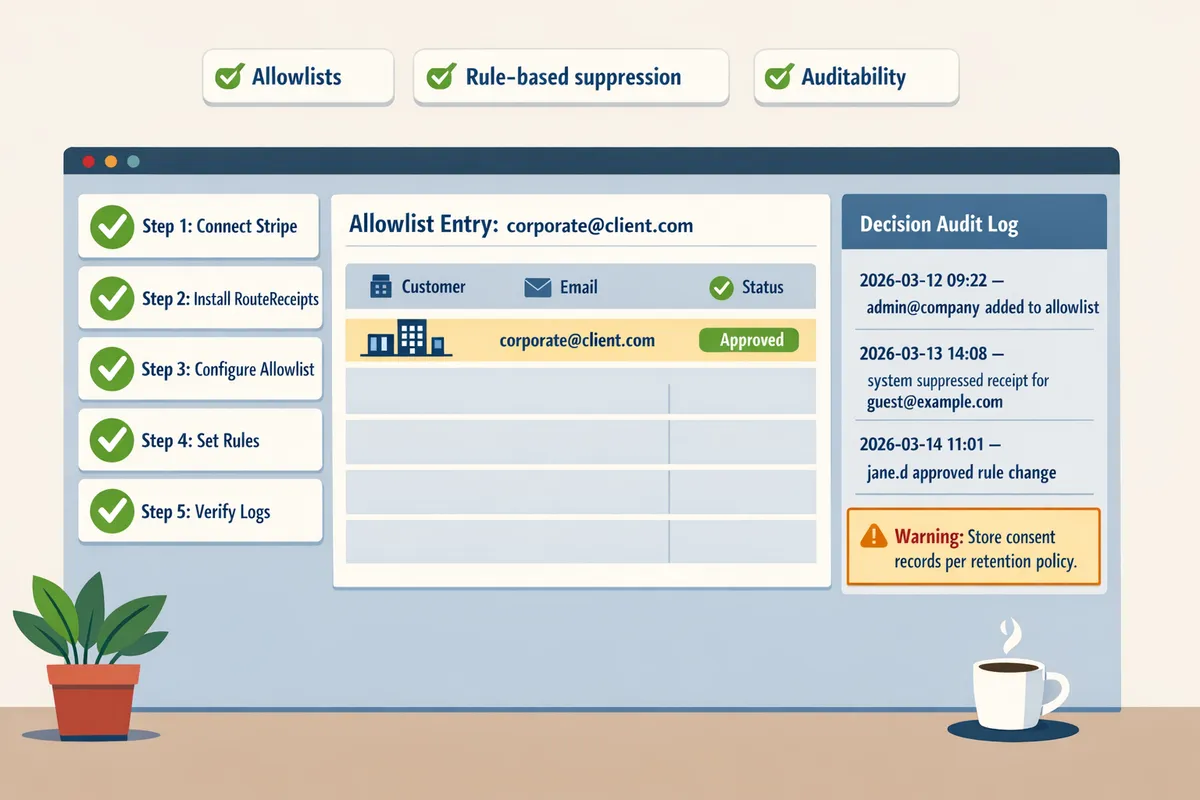
What proven strategies prevent spamming while automating receipt emails?
Use allowlists, rule-based suppression, content and frequency controls, plus verification workflows to ensure receipts go only to recipients who need them. These tactics reduce complaints and unsubscribe rates while keeping auditability for finance and compliance teams. The recommendations below show specific rule examples, verification steps, and the operational trade-offs of DIY versus a managed app like Route Receipts.
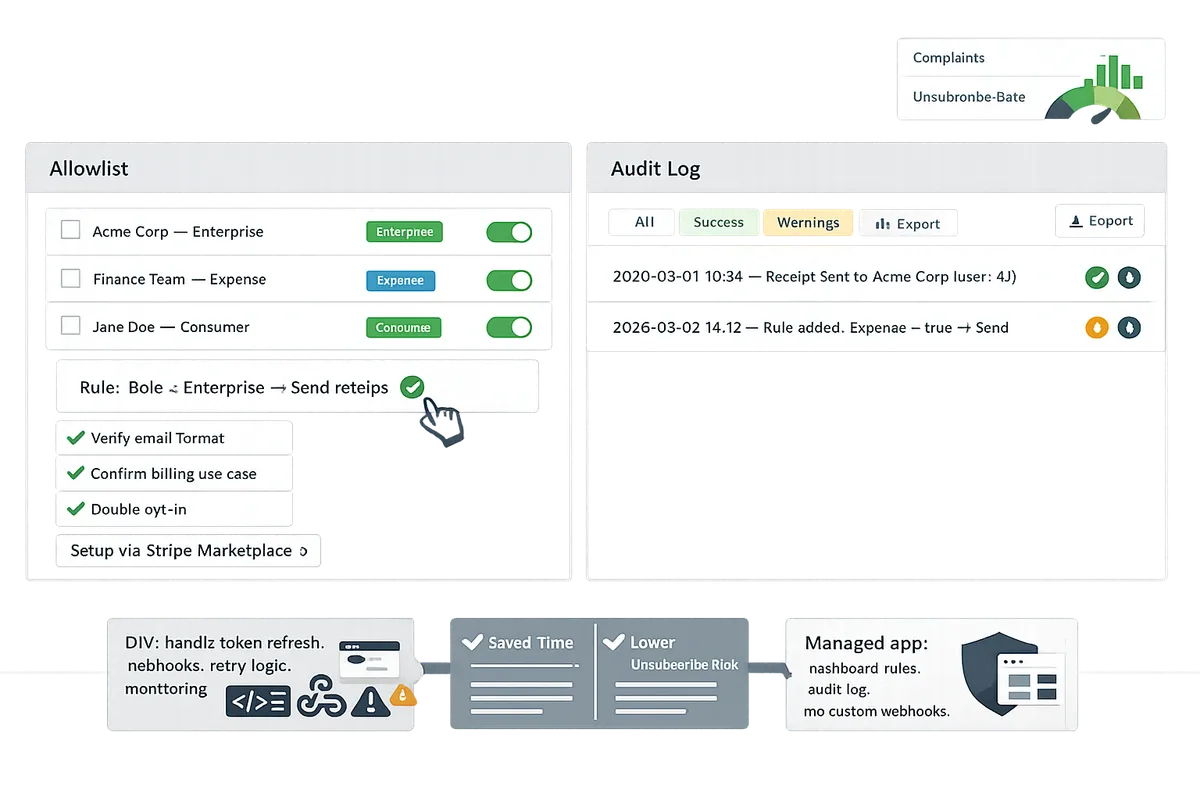
How to design allowlist and segmentation rules? 🗂️
An allowlist is a rule set that specifies which customers or emails receive receipts; design those rules around customer role, billing use case, and invoice attributes so receipts go only to necessary recipients. Example rules: send receipts for customers tagged as "expense_account" or invoices marked "reimbursable," and disable receipts for "guest_checkout" or one-off donation flows. Use these segmentation attributes as a checklist when building rules:
- Customer metadata (customer_id, account_type, department).
- Billing contact role (primary payer, finance contact, teammate).
- Subscription plan and invoice frequency (monthly vs. usage-based).
- Payment method and channel (card on file, ACH, POS).
- Invoice amount threshold (only send above X USD).
- Country and tax status (VAT/ GST requirements).
- Email domain (internal company domains vs. consumer emails).
Example implementation logic (pseudocode, high level):
- Read invoice.created webhook.
- If customer.metadata.account_type == "expense_account" send_receipt = true.
- Else if invoice.amount < threshold or invoice.mode == "guest" send_receipt = false.
- Log decision with invoice_id and rule_id.
Building this yourself requires credential management, token refresh, quota handling, webhook retries with backoff, race-condition handling for concurrent invoice events, cache invalidation for updated allowlist rules, and monitoring to detect missed or duplicated sends. Our guide "Why Did We Build Route Receipts?" explains how a dashboard-native allowlist avoids most of that engineering overhead.
💡 Tip: Start by allowlisting high-value or finance-facing customers first; expand the list after two weeks of sampling and audit-log reviews.
How to set content and frequency controls? 📩
Set content and frequency controls to limit what appears on receipts and to reduce redundant emails by consolidating or suppressing duplicates. Strip marketing copy from transactional receipts, include only essential transaction metadata, and create aggregation windows to group multiple charges into one daily digest when appropriate. For example, if a customer has three charges in one day, aggregate them into a single daily summary to reduce messages by roughly 66% compared with sending each separately.
Practical rules to implement:
- Content rule: omit promotional banners and cross-sell sections from receipt templates.
- Frequency rule: define an aggregation window (for example, 24 hours) and send one digest per billing contact per window.
- Deduplication rule: only send when invoice.status transitions to "paid" and suppress duplicate sends for split-payment events referencing the same invoice_id.
Verification steps to prevent accidental over-mailing:
- Deploy rules to a staging account receiving live webhook traffic from a small user cohort.
- Sample 500 invoices over two weeks and check send-rate, unsubscribe rate, and support tickets.
- Enable decision audit logs to trace every send and rollback quickly if metrics spike.
⚠️ Warning: Do not include full card numbers, social security numbers, or other sensitive PII in receipt emails. Keep receipts strictly transactional.
Route Receipts exposes content and dedupe controls in the dashboard so teams can toggle suppression and aggregation without redeploying code. See our Documentation for configuration steps and validation examples.
How does RouteReceipts compare to Stripe native and DIY approaches? 📊
Route Receipts provides dashboard-native selective sending and audit logs while Stripe native offers no per-customer selective control and DIY requires heavy engineering and ongoing maintenance. The table below compares the three approaches across setup effort, selective sending, auditability, and ongoing maintenance.
| Feature | Stripe native | DIY build | Route Receipts |
|---|---|---|---|
| Ease of setup | Low | High (engineering required) | Low (dashboard install) |
| Selective sending | No selective control | Yes, if built | Yes, built-in allowlist |
| Audit trail | Limited | Varies by implementation | Built-in decision audit log |
| Engineering & maintenance | None | High (credential, token, retry, monitoring) | Minimal (managed) |
Practical implications:
- Setup effort: Stripe native requires no engineering but forces an all-or-nothing policy. DIY demands building a reliable webhook layer, credential rotation, token refresh flows, retry/backoff logic, and monitoring dashboards. Route Receipts installs from the Stripe Marketplace and attaches allowlist rules to your Stripe account.
- Selective sending and auditability: DIY can produce selective sends and detailed logs if you build them, but that means instrumenting every rule evaluation and maintaining storage and retention. Route Receipts stores decision logs and exposes them in the dashboard for audits.
- Ongoing maintenance: DIY needs teams to manage quotas, cache invalidation when rules change, and race conditions when multiple invoice events occur. Route Receipts reduces that operational burden.
According to RouteReceipts, using a managed approach reduces the operational burden of maintaining rules and logs compared with a DIY service. For step-by-step, non‑engineer setup, consult The No‑Code Way to Route Customer Receipts in Stripe: Beginner’s Guide to Selective Delivery and our Documentation. For common questions about pricing, installation, and disabling Stripe automatic receipts to prevent duplicates, see our Frequently Asked Questions.
How to implement and measure automated receipts in Stripe without increasing compliance risk?
Implement and measure automated receipts in Stripe with a controlled rollout, instrumented KPIs, and monthly audit exports to limit compliance exposure. Use RouteReceipts to manage an allowlist from the Stripe dashboard, review decision logs during a pilot, and expand rules only after verifying delivery and complaint metrics. The steps below show a repeatable setup, the exact metrics to track, and a concise diagnostics checklist.
Step-by-step setup with RouteReceipts 🛠️
Install RouteReceipts from the Stripe Marketplace, grant read-only Stripe permissions, define allowlist rules, pilot a small cohort, and expand based on audit logs.
- Install RouteReceipts from the Stripe Marketplace and follow the in-app onboarding. See the Route Receipts setup guide in our documentation for screenshots and the recommended pilot checklist.
- Grant the app read-only Stripe permissions that let it read customer and invoice metadata without giving write access. This reduces blast radius if a credential is misconfigured.
- Define allowlist rules in the RouteReceipts dashboard. Use concrete selectors such as customer ID, customer email domain (example: @company.com), and metadata tags (example: receipt_pref=enabled).
- Run a pilot cohort: select 25–100 customers or 1% of monthly invoices (whichever is smaller). Review every routing decision in the RouteReceipts decision audit log for at least one full billing cycle.
- Expand rules gradually based on audit evidence: increase cohort size by 2x only after delivery rate and complaint rate remain within your thresholds for two weeks.
RouteReceipts removes the need to manage credential rotation, token refresh, retry logic, and webhook maintenance that you would otherwise build and monitor yourself. For background on why this approach reduces engineering overhead, read "Why Did We Build Route Receipts?".
⚠️ Warning: Avoid including sensitive personal health information in receipt emails; redact or move that data to secure customer portals.
What KPIs and monitoring should you track? 📈
Track delivery rate, complaint/unsubscribe rate, open rate, and audit-log events on a fixed cadence to measure both compliance and customer experience.
- Delivery rate. Measure successful SMTP/ESP accepts divided by attempts. Investigate any drop greater than 2 percentage points within 24 hours.
- Bounce and complaint/unsubscribe rate. Monitor bounces and complaints daily; trigger an investigation if complaints exceed 0.2% over a rolling 24-hour window.
- Open and engagement rates. Review weekly to detect relevance problems; low opens with low complaints can indicate receipts are unnecessary for that cohort.
- Audit-log exports. Export decision logs monthly for compliance teams in CSV or JSON to match invoice records in your accounting system.
Recommended monitoring cadence. Check delivery and complaints daily, review open rates weekly, and run a full audit export monthly. Use RouteReceipts' decision audit log as the single source of truth for routing decisions and link exports to your internal compliance repo. If metrics show rising complaints, tighten allowlist rules (for example, restrict by metadata tag instead of whole domains).
For implementation details and supported export formats, see our Documentation and the FAQ for plan limits and upgrade options.
How do you troubleshoot common implementation problems? 🛠️
Diagnose duplicate emails, wrong recipients, missing audit entries, and rate-limit errors by validating allowlist rules, inspecting RouteReceipts decision logs, checking webhook delivery status, and reviewing ESP bounce reports.
Use this diagnostics checklist:
- Verify allowlist logic. Confirm the selector matches the intended customer IDs, domains, or metadata. A single mis-typed metadata key causes broad mismatches.
- Check RouteReceipts decision logs. Confirm the app recorded a decision for each invoice. Missing entries indicate routing was not evaluated.
- Inspect Stripe webhook delivery only if you run custom webhooks. Examine recent delivery status and webhook retry headers; absent retries suggest credential or endpoint failures.
- Review your email provider bounce reports. Match bounced recipient addresses to customer records and update metadata or suppress rules.
- Confirm API rate-limit headers if you see 429s. If you built a DIY router, add exponential backoff and retries with jitter; if you use RouteReceipts, these concerns are handled by the app.
- Reproduce duplicates by checking whether both Stripe automatic receipts and RouteReceipts delivery are enabled; use the FAQ to see how to disable Stripe's automatic receipts to prevent duplicates.
If you reach a dead end, export a short sample (10–25 invoices) with routing decisions and timestamps and share it with your compliance or ops team for forensic review. For troubleshooting articles and common fixes, consult our Documentation and the beginner's guide to no-code routing.
Frequently Asked Questions
This FAQ answers common operational, compliance, and product questions about automating receipts in Stripe and using RouteReceipts. RouteReceipts is a Stripe App that controls which customers receive invoice receipt emails by maintaining an allowlist and a dashboard-native routing workflow.
Can I send automated receipts in Stripe only to selected customers? ✅
Yes: RouteReceipts lets you send automated receipts only to selected customers through an allowlist configured in the Stripe dashboard. RouteReceipts supports allowlist rules based on customer ID, email, subscription plan, or custom metadata so you can match enterprise clients, expense-reporting users, or any opt-in cohort. For operational detail, disable Stripe's automatic receipts to avoid duplicates and use RouteReceipts to drive delivery; see our guide on why we built Route Receipts for background and design trade-offs.
How do I automate receipt emails without spamming? 📬
Use allowlists, explicit consent, content limits, and suppression rules to prevent spam when automating receipt emails with RouteReceipts. Run a pilot cohort and monitor delivery metrics (open rate, delivery failures), complaint rate, and support ticket volume; for example, pilot 1,000 customers for two billing cycles to surface edge cases. Add suppression for duplicate invoice IDs and frequency caps per customer. See the no-code rollout guide for stepwise setup and suppression examples.
Will RouteReceipts require custom webhooks or code changes? 🧩
No: RouteReceipts installs from the Stripe Marketplace and provides dashboard-native configuration that avoids custom webhook engineering and token management. Building a DIY solution would require hosting webhook endpoints, managing signing secrets, token refresh, quota tracking, retry logic with exponential backoff, idempotency handling, and monitoring for race conditions. RouteReceipts removes that operational burden by handling webhook events, decision logic, and retry semantics in the app; consult the Documentation for integration and install steps.
How does RouteReceipts maintain an audit trail for compliance? 📑
RouteReceipts records each send or suppress decision with timestamps, invoice and customer references, and decision reasons in a decision audit log accessible from the dashboard. You can export the audit log as CSV or JSON for audits, and each entry links to the underlying Stripe invoice ID to prove whether a receipt was sent or suppressed. For compliance workflows, pair audit exports with role-based access controls and retention policies; learn more about audit exports in our documentation.
What privacy and security considerations apply to automated receipts? 🔐
Limit sensitive data in receipts, enforce TLS for email transport, restrict dashboard access with role-based controls, and keep immutable logs for auditability. Do not include full card numbers, social security numbers, or detailed medical information in receipt bodies; instead include invoice IDs and minimal billing descriptors. Require MFA for dashboard users, log administrative actions, and set retention rules that meet GDPR or other regional requirements. For more settings and export controls, see our FAQ and Documentation.
⚠️ Warning: Avoid including personal health information or full government identifiers in receipt text or attachments.
How do I transition from sending receipts to all customers to a selective model? 🔀
Transition with a staged rollout: identify pilot cohorts, configure allowlist rules, run the pilot while monitoring KPIs, and iterate rules before expanding.
- Pick a small pilot (for example, finance teams or enterprise plans) and add them to the allowlist.
- Disable Stripe automatic receipts for the pilot group to prevent duplicates and enable RouteReceipts routing.
- Monitor delivery rate, spam complaints, unsubscribe actions, and support tickets for two billing cycles.
- Adjust allowlist criteria and suppression rules based on observed edge cases (missing emails, multiple contacts per customer).
- Expand the cohort in phases and keep rollback steps ready (re-enable Stripe receipts or pause routing). See the no-code beginner's guide for a step-by-step checklist and common pilot metrics to track.
For more context on product rationale and implementation templates, read "Why Did We Build Route Receipts?" and consult our Documentation for installation and troubleshooting. For quick answers about plans and install options, visit our Frequently Asked Questions.
Selective automated receipts reduce email noise while keeping finance teams auditable and compliant.
Routing receipts selectively reduces unnecessary messages for customers who do not need them and keeps required records for those who do. Route Receipts is a specialized application designed to enhance the way businesses manage their Stripe receipt distribution. This app addresses a significant limitation within Stripe's native functionality, which traditionally forces businesses to either send receipts to all customers or none at all. RouteReceipts empowers businesses with the flexibility to selectively send receipts to specific customers, thereby preventing unnecessary email clutter for those who do not require them. By integrating directly into the Stripe dashboard, RouteReceipts allows users to manage an allowlist of customers effortlessly, without the need for complex coding or custom webhook integrations. The application features a dashboard-native user interface, a decision audit log for transparency, and a straightforward setup process via the Stripe Marketplace. RouteReceipts offers a tiered pricing model, starting with a free plan that includes 20 receipts per month, with the option to upgrade for higher volume needs. This solution is ideal for businesses seeking to streamline their financial communications and maintain a professional relationship with their clients by ensuring that only necessary communications are sent.
Start a free trial of Route Receipts from the documentation to apply the highest-impact practice first and see immediate reductions in email noise. Subscribe to our newsletter for implementation tips and updates.